 USA GREAT
Restaurants, Cafés and Food Businesses
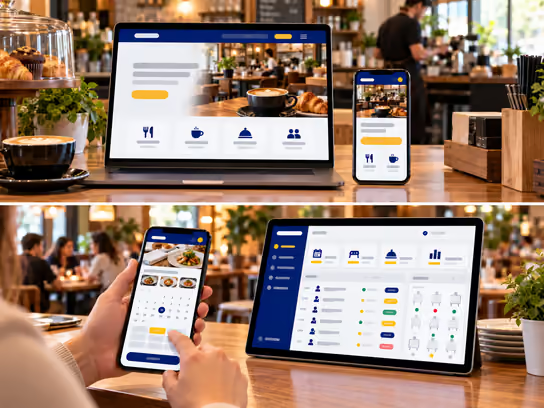
1. Digital solutions for restaurants, cafés and food businesses
Restaurants, cafés, bakeries, food trucks and catering businesses need a clear website showing their menu, business hours, location and ways to contact them and place orders. We help you build a website that presents menu items, photos, ingredients and the information you provide, with options for reservations, direct ordering or catering inquiries depending on your business.
If you handle many orders or operate more than one location or kitchen, we can develop a web application to organize orders, pickup and delivery times, reservations, menus and basic inventory. Direct ordering through your website can provide another channel for reaching customers and reduce reliance on third-party delivery apps, without assuming you can eliminate them entirely.
2. Types of websites and systems
- Informational website for a restaurant or café: Shows the menu, business hours, location and contact details. Example: a café displays drinks, baked goods and its location on Google Maps.
- Direct ordering and pickup website: Lets customers choose items, quantities, extras and an available pickup or delivery time. Example: a bakery accepts advance orders for pickup at its location.
- Reservation and catering website: Accepts table reservations or catering inquiries. Example: a restaurant organizes guest reservations or a catering business receives event details to prepare a quote.
- Order and location management system: A web application that organizes orders received through the website, routes them to staff and tracks preparation and fulfillment. Example: a business with a restaurant and a food truck monitors orders for each location from one dashboard.
3. Core website and system components
Customer and visitor interface
- Learn about the restaurant, café or food business.
- View the menu, items, photos and descriptions.
- Open the menu using a QR code at a table or in the establishment.
- View listed prices, extras and item options.
- Review ingredient and food allergy information provided by the business.
- Find business hours, addresses and service areas.
- Open the location in Google Maps when integrated.
- Select items and add them to an order cart.
- Choose pickup or delivery when offered.
- Select a suitable time from available options.
- Submit a table reservation request or catering inquiry.
- Receive order confirmations and status updates.
- View order history and invoices when a customer account is provided.
- Contact the business about an order or reservation.
Business owner and staff dashboard
- Update menus, items, prices and availability.
- Receive and confirm orders or explain when they cannot be fulfilled.
- Organize orders by pickup or delivery time.
- View preparation, packing and fulfillment status.
- Manage table reservations and schedules.
- Track catering inquiries and quotes.
- Manage different menus by location or time.
- Record payments and prepare invoices.
- Track basic ingredients and supplies when available.
- Send order confirmations and appropriate alerts.
- View reports on orders and most-requested items based on recorded data.
Administration dashboard
- Manage staff accounts and permissions.
- Manage locations, addresses and business hours.
- Set delivery and pickup areas and order acceptance rules.
- Manage menus, items and extras.
- Set ordering and reservation hours.
- Manage tax and fee rules based on approved settings.
- Manage promotions and coupons when offered.
- Track payments, cancellations and refunds.
- Manage integrations with point-of-sale, payment and mapping systems.
- View reports, activity logs and backups.
4. Supporting technical systems
| System | Purpose |
|---|---|
| Menu management system | Organize items, descriptions, extras and availability |
| Direct ordering system | Receive website orders and record their details |
| Point-of-sale (POS) system | Connect orders and sales when suitable integration is available |
| Table reservation system | Manage times, capacity and reservations |
| Google Maps | Show locations and help customers reach them |
| Order management system (OMS) | Track orders from receipt through preparation and fulfillment |
| Delivery management system | Organize delivery zones and delivery status when offered |
| Stripe or PayPal | Collect online payments when needed |
| Inventory management system | Track recorded ingredients and supplies |
| Customer relationship management (CRM) | Organize customer information and inquiries |
| Catering request management system | Collect event details, prepare quotes and follow up |
| Google Calendar or Microsoft Outlook | Sync event reservations and appointments |
| Notification system | Send order and booking confirmations and status updates |
| Google Analytics | Analyze website use according to privacy settings |
| Backups and activity logs | Support data recovery and record important actions |
Supporting systems can be chosen based on the business. A café may only need a website with its menu and location, while a restaurant offering direct ordering may need payments and order management. A catering business may need forms, quotes and fulfillment schedules.
5. Advanced features
Managing direct orders and pickup times
Imagine your restaurant receives website orders during busy periods. Customers can select items, extras and a pickup time from those offered by the business, then submit an order that appears in the staff dashboard or a connected system.
Staff can update the order from received to preparing and ready, and send an appropriate notification to the customer. Management can temporarily stop accepting new orders or adjust available times based on operational capacity. This does not replace hands-on staff oversight.
Managing catering requests
Imagine a customer wants food prepared for a meeting or private event. They can submit the event date, location, approximate guest count, food preferences and required services, along with additional notes about guests' needs.
Staff review the details and contact the customer to confirm availability, then prepare a suitable quote. After approval, preparation tasks, delivery times, documents and invoices can be organized in one record. Submitting a request does not automatically confirm that the service is available.
6. Development and operating costs
Costs vary based on the number of locations and menu items, ordering, payment, reservation and delivery features, POS integrations, users and other required integrations.
| Solution type | Development cost | Operating cost |
|---|---|---|
| Informational website with a menu | Low | Low |
| Website with an interactive menu and inquiry form | Low to medium | Low |
| Direct ordering and pickup website | Medium | Low to medium |
| Table reservation and catering inquiry website | Medium | Low to medium |
| Order management system with POS integration | Medium to high | Medium |
| Integrated system for locations, orders and delivery | High | Medium to high |
| Multi-location platform with reports and centralized management | High | High |
Operating costs may include hosting, maintenance, backups, messages, payment fees, third-party subscriptions, mapping services and POS integrations, depending on project scope.
7. Digital solution levels
You can start with a website showing your menu and location, then add direct ordering, reservations and integrations with operational systems as your business grows.
| Feature | Starter | Advanced | Comprehensive |
|---|---|---|---|
| Professional informational website | ✓ | ✓ | ✓ |
| Online menu | ✓ | ✓ | ✓ |
| QR code menu | ✓ | ✓ | ✓ |
| Location and business hours pages | ✓ | ✓ | ✓ |
| Google Maps link | ✓ | ✓ | ✓ |
| Contact and inquiry form | ✓ | ✓ | ✓ |
| Direct ordering through the website | — | ✓ | ✓ |
| Order cart and item extras | — | ✓ | ✓ |
| Available pickup or delivery selection | — | ✓ | ✓ |
| Table reservations or catering requests | — | ✓ | ✓ |
| Staff dashboard and order management | — | ✓ | ✓ |
| Order confirmations and updates | — | ✓ | ✓ |
| Online payments | — | ✓ | ✓ |
| POS integration | — | — | ✓ |
| Menu management by location | — | — | ✓ |
| Delivery and service area coordination | — | — | ✓ |
| Basic inventory management | — | — | ✓ |
| Advanced permissions and activity logs | — | — | ✓ |
| Advanced operational and administrative reports | — | — | ✓ |
| Multi-location support | — | — | ✓ |
These levels illustrate how to organize the project scope; they are not fixed packages. We determine the final features and cost through a quote based on the type of business, number of locations and orders and systems you use.
8. Legal and privacy considerations
Food businesses handle contact information, orders, addresses, reservations and payments. Food preparation and sales are also subject to requirements that may vary by state, local authority and service type. When developing a website or system for this sector, consider the following:
- Food and operating permits: Restaurants, bakeries, food trucks and catering businesses may need appropriate health permits or local licenses. Building a website or ordering system does not grant those permits.
- Food safety and allergy information: The business must determine required ingredient and allergen information under applicable rules. A website alone does not guarantee the accuracy of that information or food safety.
- Customer data protection: State-level U.S. privacy laws, such as the California Consumer Privacy Act (CCPA), may apply depending on the business and the law's scope.
- Online payments: Processing card data may require compliance with PCI DSS depending on the payment method.
- Prices, fees and taxes: Applicable laws may require disclosures about prices, fees, taxes and cancellation and refund policies.
- Delivery and pickup: Service areas, hours and terms should be clear, with attention to any local delivery requirements.
- Promotions and subscriptions: Coupons, promotions and recurring subscriptions may be subject to consumer protection, disclosure, consent and cancellation requirements.
- Marketing messages: Rules such as the CAN-SPAM Act or Telephone Consumer Protection Act (TCPA) may apply depending on the communication channel, message and consent.
- Photos and intellectual property: Rights to food photos, logos, menus and published content should be respected.
- Digital accessibility: Accessibility requirements may apply under the Americans with Disabilities Act (ADA) or other laws, depending on the business. WCAG guidelines can be used as a technical reference.
- Analytics and advertising tools: Appropriate disclosures and privacy options should be considered when using Google Analytics, Google Ads and Meta Pixel.
We can develop technical features to organize menus, orders, reservations, payments and permissions, but identifying health, legal and tax requirements and verifying compliance requires an independent assessment by the business owner and qualified advisors. Implementing a system or connecting a third-party service does not guarantee compliance with any particular law or standard.
9. Start building your food business's digital presence
Whether you run a restaurant, café, bakery, food truck or catering business, we help you choose a suitable digital solution, from a website showing your menu and location to a web application that accepts direct orders and organizes reservations, locations and delivery, with room to add features as your business grows.