 USA GREAT
Tax and Accounting Firms
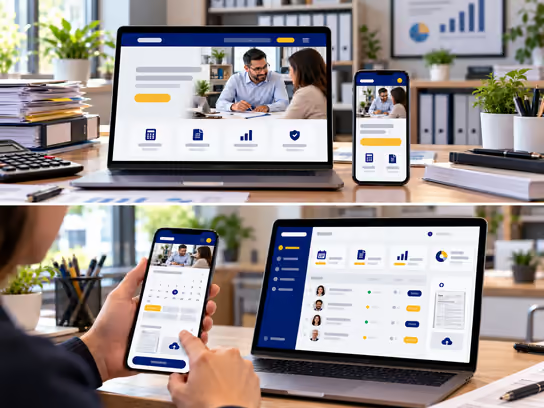
1. Digital Solutions for Tax and Accounting Firms
Tax and accounting firms need a professional digital presence that helps clients learn about their services, including tax return preparation, bookkeeping, financial reporting and accounting advisory. We help you build a website that presents your firm's services clearly and makes it easy to request consultations, book appointments and onboard new clients, while considering the sensitive financial and personal information these firms handle.
If your firm manages tax and accounting files for many individuals and businesses, we can build a web application that helps you organize clients, documents, tasks, appointments and invoices, with a secure online portal for exchanging files. The system can connect to the accounting and tax preparation tools you already use, when those tools allow integration, without replacing your current systems.
2. Types of Websites and Systems
- Tax and accounting firm website: Presents your firm's services, specialties, team credentials, office locations and contact options, with separate pages for individual and business services. Example: a website for a firm that offers tax return preparation for individuals, bookkeeping for small businesses and tax advisory for business owners.
- Consultation booking and client intake website: Lets clients choose the service they need, pick a convenient time and complete an intake form before the meeting. Example: a small business owner selects bookkeeping, books a consultation and receives a list of the initial information needed.
- Client and document portal: Gives clients private accounts where they can upload documents, receive information requests, track the status of their files and view documents the firm makes available. Example: a client logs in to upload the income and expense documents needed for their tax return and gets a notification when an additional document is requested.
- Tax and accounting practice management system: An internal web application for organizing clients, files, tasks, appointments, documents and invoices, with the ability to assign work to accountants and staff. Example: an office manager tracks files in progress, files waiting on client documents and tasks assigned to each staff member.
3. Core Website and System Components
Client and Visitor Interface
- Learn about the tax and accounting services the firm offers.
- View accountants' areas of expertise and professional credentials.
- Submit a service or consultation request.
- Book an in-person or virtual appointment.
- Complete a client intake form.
- Log in to the client portal when available.
- Upload financial and tax documents through a secure channel.
- Track the status of files using information made available by the firm.
- View and pay invoices online, when the service is available.
- Receive document requests and important notifications.
Accounting Firm Staff Dashboard
- Manage client records and new service requests.
- Create tax or accounting files for each client.
- Organize documents and link them to the right client and financial period.
- Build lists of required documents for each service type.
- Assign tasks to accountants and staff.
- Track file preparation and review stages.
- Manage appointments, meetings and alerts.
- Follow up on missing documents and pending requests.
- Log time spent on services when needed.
- Prepare invoices and track payment status.
- Add internal notes based on staff permissions.
Administration Dashboard
- Manage staff accounts, roles and permissions.
- Set access levels for files and financial information.
- Manage services and client intake forms.
- Organize offices and teams.
- Track how files and tasks are distributed.
- View workflow and billing reports.
- Manage notification settings and third-party integrations.
- Review activity logs and key operations.
- Manage document retention policies based on the firm's requirements.
- Oversee security and backup settings.
4. Supporting Technical Systems
| System | Purpose |
|---|---|
| Customer relationship management (CRM) system | Organize data on prospective and current clients, service requests and follow-up stages |
| Appointment booking system | Organize consultations and meetings and show available times |
| Google Calendar or Microsoft Outlook | Sync appointments with the firm's and employees' calendars |
| Zoom or Microsoft Teams | Hold virtual meetings and consultations |
| QuickBooks or Xero | Integrate with accounting and invoice data when suitable APIs are available |
| Tax preparation software | Exchange data or documents with the software the firm uses, when its technical capabilities allow |
| Document management system (DMS) | Organize financial and tax files and manage access permissions and document versions |
| E-signature system | Send documents for review and electronic signature using a service suited to the document type and applicable legal requirements |
| Stripe or another suitable payment provider | Collect service fees and online invoice payments when needed |
| Notification system | Send appointment confirmations, document requests and permitted updates |
| Multi-factor authentication (MFA) | Add a layer of protection to client and staff accounts |
| Backup system | Create encrypted backups and support data recovery procedures |
| Audit log | Record key access and change events to support review and investigation |
Supporting systems can be chosen based on the software your firm already uses, with data access permissions, storage policies and security reviewed before connecting any third-party service.
5. Advanced Features for Tax and Accounting Firms
Automated Document Collection and Workflow Tracking
Imagine tax season has started and your firm is handling a large number of clients. Instead of sending separate messages to each client and tracking documents by hand, the system can create a list of required documents based on the service type and the initial information your firm defines.
Clients log in to their accounts and upload the required documents, while the staff dashboard shows the status of each file and which documents are still missing. The system can send automatic reminders through approved channels without including sensitive financial information in the messages.
This helps organize work and reduce manual follow-up. Reviewing documents and confirming their completeness remain the responsibility of the assigned staff member.
Tax Workflow and Deadline Management
Imagine your firm provides tax and accounting services to individuals and businesses with different financial periods and filing requirements. The system can organize files by service type, tax period, responsible staff member and current work stage.
Accountants can enter relevant dates for each file, create tasks for review, approval and filing, and schedule alerts before deadlines. Management can see which files need extra attention.
Determining the correct legal deadlines, verifying eligibility for extensions and reviewing and filing returns remain the responsibility of the qualified professionals at your firm. The system is not a substitute for approved tax software or professional review.
6. Development and Operating Cost Levels
Costs depend on the required features, financial data volume, security requirements, number of users and integrations with accounting and tax software.
| Solution Type | Development Cost | Operating Cost |
|---|---|---|
| Tax and accounting firm website | Low | Low |
| Website with consultation booking and client intake | Medium | Low to medium |
| Client and document portal | Medium to high | Medium |
| Client file and task management system | High | Medium to high |
| Integrated multi-location system with third-party software integration | High | High |
Operating needs may include hosting, maintenance, backups, secure storage, notification services and third-party subscriptions. Actual cost levels vary based on project scope and security and integration requirements.
7. Solution Levels
You can start with a professional website that presents your services and handles client intake, then add a client portal and systems for managing files and staff over time.
| Feature | Starter | Advanced | Comprehensive |
|---|---|---|---|
| Professional firm website | ✓ | ✓ | ✓ |
| Tax and accounting service pages | ✓ | ✓ | ✓ |
| Service or consultation request form | ✓ | ✓ | ✓ |
| Online appointment booking | — | ✓ | ✓ |
| Prospective client request management | — | ✓ | ✓ |
| Staff dashboard | — | ✓ | ✓ |
| Task and deadline management | — | ✓ | ✓ |
| Private client portal | — | ✓ | ✓ |
| Document upload and organization | — | ✓ | ✓ |
| Required document lists | — | ✓ | ✓ |
| File preparation stage tracking | — | ✓ | ✓ |
| Automatic reminders for missing documents | — | — | ✓ |
| Invoice and payment management | — | — | ✓ |
| Accounting software integration | — | — | ✓ |
| Tax software integration, when available | — | — | ✓ |
| Advanced permissions and activity logs | — | — | ✓ |
| Advanced management reports | — | — | ✓ |
| Multi-location support | — | — | ✓ |
These are illustrative levels to help define project scope, not fixed packages. We define the final features and costs in a quote based on your firm's needs, services and existing systems.
8. Legal and Privacy Considerations
Tax and accounting firms handle sensitive financial and personal information, such as taxpayer identification numbers, income data, bank accounts, financial documents and tax returns. When building a website or system for this industry, the following points should be considered:
- Tax information confidentiality: Tax information may be subject to specific rules, including Internal Revenue Code Sections 7216 and 6713, which address the use and disclosure of tax return information in certain circumstances.
- Client information protection: The requirements of the Gramm-Leach-Bliley Act (GLBA) and the Federal Trade Commission's Safeguards Rule may apply to certain activities and organizations that provide financial services, including some tax preparation and accounting firms.
- Information security requirements: Your firm may need a written information security plan, access controls and security incident response procedures, depending on the laws and requirements that apply to its activities.
- Data privacy: U.S. state privacy laws, such as the California Consumer Privacy Act (CCPA), may apply depending on the nature of the business, the scope of the law and any relevant exemptions.
- Identification numbers and sensitive data: Collection of Social Security numbers, bank details and other sensitive information should be limited to what is needed to provide the service, with appropriate controls for storage, access and transfer.
- Document retention: Tax and accounting records may be subject to different retention requirements, depending on the document type, the service and the relevant regulatory authority.
- Electronic communications: Avoid sending tax documents or sensitive financial information through unprotected messages, and use appropriate methods for exchanging files.
- E-signatures: Some documents, tax returns, authorizations and electronic signatures may be subject to specific rules. Using an e-signature service does not guarantee that all documents are legally valid or accepted by tax authorities.
- Online payments: Processing payment card data may require following standards such as PCI DSS, depending on the payment method and the parties involved in processing.
- Third-party software integration: Data access permissions, software provider terms and information retention policies should be evaluated when connecting with accounting, tax preparation and cloud storage tools.
- Digital accessibility: Accessibility requirements for websites and digital services may apply depending on the laws and the nature of the services involved. WCAG standards can provide technical guidance.
We can build technical features that help organize data, manage access permissions and support appropriate safeguards. However, compliance with tax and financial laws and information security requirements needs an independent assessment by your firm and qualified legal and security professionals. Implementing these features does not guarantee compliance with any specific law or standard.
9. Start Building Your Tax and Accounting Firm's Digital Presence
Whether you are an independent accountant, run a tax preparation office or lead an accounting firm that serves individuals and businesses, we help you choose the right digital solution. Options range from a professional website that handles client intake to a fully integrated web application for managing files, documents and staff, with room to add new features as your business grows.