 USA GREAT
Law Firms and Legal Services
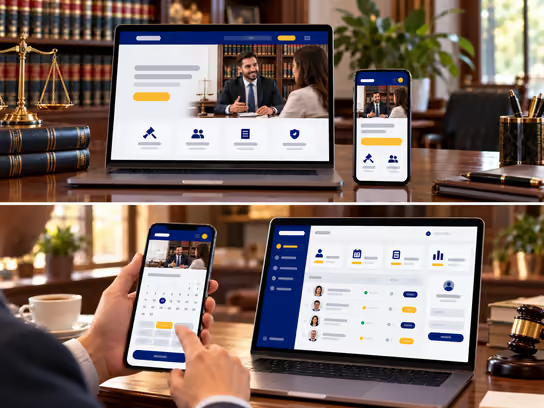
1. Digital Solutions for Law Firms
A law firm needs a professional digital presence that helps prospective clients learn about its practice areas, its attorneys' experience and qualifications and how to request a consultation. We help you build a website that presents your firm's services clearly and makes it easy to get in touch and book appointments. We consider the nature of legal work and professional confidentiality requirements.
If your firm handles a large number of cases or works with a team of attorneys and staff, we can develop a web application that helps you organize case files, assign tasks and track deadlines, documents and invoices. You can start with an informational website and add operational systems step by step as your firm's needs grow.
2. Types of Websites and Systems
- Law firm informational website: Presents practice areas, attorney profiles, office locations and contact options. Example: a website for a firm focused on family, real estate and immigration law, with a dedicated page for each practice area.
- Legal consultation booking website: Lets visitors choose a practice area, select an available time and submit the required initial information. Example: a client books a business law consultation and receives a confirmation with the meeting time and attendance instructions.
- Client portal: Gives current clients private accounts to view authorized documents, send files and view updates shared by the firm. Example: a client logs in to upload a requested document or read a new message from the attorney handling their case.
- Law firm management system: An internal web application that helps manage cases, clients, tasks, appointments, documents, invoices and permissions. Example: the office manager can see the cases assigned to each attorney, upcoming appointments and tasks that need follow-up.
3. Core Website and System Components
Client and Visitor Interface
- Learn about the firm and its practice areas.
- View attorney profiles and professional qualifications.
- Submit a consultation request or general inquiry.
- Book an in-person or virtual appointment.
- Read frequently asked questions and general information.
- Upload required documents through a secure channel when this service is offered.
- Log in to the client portal, if available.
Law Firm Staff Dashboard
- Manage consultation requests and prospective clients.
- Create case files and organize related documents.
- Assign tasks to attorneys and staff.
- Manage appointments, meetings and reminders.
- Track time spent on legal work when needed.
- Prepare invoices and track their status.
- Record internal notes and updates according to user permissions.
Administration Dashboard
- Manage attorney and staff accounts and roles.
- Set access permissions for files and documents.
- Manage practice areas and website content.
- Track contact and consultation requests.
- View reports on work, appointments and invoices.
- Manage system settings and external integrations.
- Review activity logs and important changes when enabled.
4. Supporting Technical Systems
| System | Function |
|---|---|
| Customer relationship management (CRM) system | Organizes prospective client data, contact requests and follow-up stages |
| Appointment booking system | Shows available times and organizes consultations and meetings |
| Google Calendar or Microsoft Outlook | Syncs appointments with the firm's calendar |
| Zoom or Microsoft Teams | Hosts virtual consultations and meetings |
| Stripe or another suitable payment provider | Collects consultation fees and online invoice payments when needed |
| Document management system (DMS) | Organizes files and manages access permissions and document versions |
| Electronic signature system | Sends documents for electronic signature through a service suited to applicable legal requirements |
| Notification system | Sends appointment confirmations, reminders and permitted updates |
| Backup system | Creates data backups and supports recovery procedures |
| Audit log | Records important actions to help review access and changes |
Supporting systems can be chosen based on your firm's size and needs, with attention to confidentiality and information protection requirements when connecting external services.
5. Advanced Features for Law Firms
Conflict of Interest Screening
Imagine a new client asks the firm to represent them in a commercial dispute. Before opening a case file, an authorized staff member can enter the names of the parties involved. The system then searches the firm's available records and shows any potential matches.
This helps the responsible attorney review possible conflicts of interest before deciding whether to accept the representation. The automated search does not replace professional review or verification of data completeness.
Legal Deadline and Task Management
Imagine an attorney enters a hearing date or filing deadline. The system can create tasks linked to that date, assign them to team members and send reminders before the deadline arrives.
Dates can also appear in a shared calendar based on user permissions. Verifying legal deadlines, calculating time periods and meeting deadlines remain the responsibility of the firm's qualified professionals. The system does not replace legal review.
6. Development and Operating Cost Levels
Costs depend on the required features, data volume, security requirements, external integrations and number of users.
| Solution Type | Development Cost | Operating Cost |
|---|---|---|
| Law firm informational website | Low | Low |
| Website with consultation booking | Medium | Low to medium |
| Client portal | Medium to high | Medium |
| Case and office management system | High | Medium to high |
| Integrated multi-office system | High | High |
Possible operating needs include hosting, maintenance, backups, notification services and third-party subscriptions. Cost levels may change based on project scope and security requirements.
7. Solution Levels
You can choose the level that fits your firm's current stage, then add more features as needed.
| Feature | Starter | Advanced | Comprehensive |
|---|---|---|---|
| Professional informational website | ✓ | ✓ | ✓ |
| Practice area and attorney pages | ✓ | ✓ | ✓ |
| Consultation request form | ✓ | ✓ | ✓ |
| Online appointment booking | — | ✓ | ✓ |
| Prospective client request management | — | ✓ | ✓ |
| Staff dashboard | — | ✓ | ✓ |
| Task assignment and deadline tracking | — | ✓ | ✓ |
| Private client portal | — | — | ✓ |
| Case and document management | — | — | ✓ |
| Invoice and payment management | — | — | ✓ |
| Initial conflict of interest screening | — | — | ✓ |
| Advanced permissions and activity logs | — | — | ✓ |
| Advanced management reports | — | — | ✓ |
| Multi-office support | — | — | ✓ |
These levels are examples to help define the project scope. They are not fixed packages. We define the final features and costs in a quote based on your firm's needs.
8. Legal and Privacy Considerations
Law firms handle information that can be highly sensitive, such as client data, legal correspondence, case documents and information protected by professional confidentiality or attorney-client privilege. When developing a website or system for a law firm, the following should be considered:
- Confidentiality: Client data and correspondence may be subject to professional confidentiality rules and attorney-client privilege, depending on the jurisdiction and the nature of the information.
- Professional conduct and advertising rules: Legal service pages, client testimonials, reviews and statements about results may be subject to attorney conduct and advertising rules, such as the rules of state bar associations in the U.S.
- Data protection: Privacy laws such as the California Consumer Privacy Act (CCPA), or other laws, may apply depending on the firm's location, its clients' locations and the type of data involved.
- Attorney-client relationship: Submitting a contact form or consultation request does not necessarily create an attorney-client relationship. The firm may need to display an appropriate legal notice before receiving sensitive information.
- Document retention: Professional or legal requirements may govern how client files are stored, how long they are retained and how they are destroyed.
- Payments: Client funds and attorney trust accounts may be subject to special rules that differ from collecting regular service fees.
- Third-party services: Privacy, storage and data access policies should be evaluated when using meeting, payment or cloud storage tools.
- Accessibility: Digital accessibility requirements may apply depending on the nature of the service and applicable laws. WCAG standards can provide technical guidance.
We can develop technical features that support user permissions, data protection and access management. However, compliance with legal and professional requirements needs an independent assessment by the firm and its qualified advisors. Implementing these features does not guarantee compliance with any specific law or standard.
9. Start Building Your Law Firm's Digital Presence
Whether you are a solo attorney who needs a professional website or run a law firm that needs a system to organize cases, clients and staff, we help you find a digital solution that fits your needs and budget. Your solution can grow with new features as your practice grows.