 USA GREAT
Clinics and Healthcare Providers
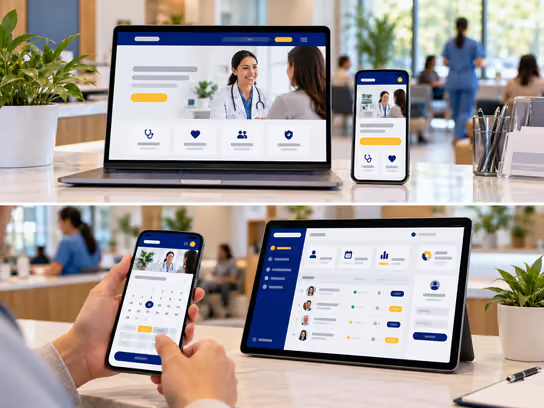
1. Digital Solutions for Clinics and Healthcare Providers
Clinics and medical centers need a professional digital presence. It helps patients learn about your medical services, doctors' specialties and qualifications, clinic locations and appointment booking options. We help you build a website that presents your services clearly, makes it easy for patients to contact your clinic and choose a doctor and appointment time. We also take into account the privacy of health information and the nature of the services you provide.
If your clinic has several doctors or specialties, or manages a large number of appointments and records, we can develop a web application for you. It can help you organize bookings, manage patient intake, assign tasks to staff and offer an online patient portal. The solution can connect to the electronic health record systems your clinic uses when suitable integration options are available, without replacing your current medical systems.
2. Types of Websites and Systems
- Clinic or medical center website: Presents your specialties and medical services, doctor profiles and qualifications, clinic locations, hours and contact options. Example: a family medicine clinic website that presents routine checkups and preventive care, with individual doctor profiles and appointment booking information.
- Medical appointment booking website: Lets patients choose a specialty, doctor, location and available appointment time. The system collects basic booking information and sends confirmations. Example: a patient looking for a dermatology appointment picks an available time and receives a booking confirmation and visit instructions.
- Online patient portal: Gives patients private accounts where they can complete intake forms, update their information and view the documents and information the clinic chooses to share. Example: a patient signs in before a visit to complete an intake form and upload a document the clinic requested through a secure channel.
- Clinic and appointment management system: A web application that helps front desk and administrative staff organize appointments and check patients in. It also helps them manage doctor, room and resource schedules and track administrative tasks. Example: front desk staff can view upcoming appointments, check patients in and let the doctor know a patient is waiting, based on system permissions.
3. Core Website and System Components
Patient and Visitor Interface
- Learn about the clinic, its specialties and its services.
- View doctor profiles and professional qualifications.
- Find branch locations, hours and contact options.
- Search for an appointment by specialty, doctor or branch.
- Book an appointment or request to reschedule or cancel it.
- Complete initial intake forms.
- Review visit preparation instructions.
- Sign in to the patient portal when one is offered.
- Update contact details and other information patients are allowed to edit.
- Upload required documents through a secure channel.
- View and pay bills online when the service is available.
- Send administrative requests or secure messages based on available services.
Healthcare Staff Dashboard
- View appointment schedules by doctor and specialty.
- Manage appointment booking, rescheduling and cancellation requests.
- Check patients in and track their waiting status.
- Manage room and resource availability.
- Review intake forms and administrative documents.
- Track and respond to patient requests based on permissions.
- Create staff tasks and track their completion.
- Manage waitlists and canceled appointments.
- Track billing and administrative payments when needed.
- Access integrated medical systems based on approved permissions.
Administration Dashboard
- Manage doctor and staff accounts and roles.
- Set access permissions for patient data.
- Manage specialties, services and branches.
- Organize doctor schedules, working hours and time off.
- Manage booking and cancellation policies.
- Track contact requests and appointments.
- View operational reports on bookings and cancellations.
- Manage notification settings and external integrations.
- Review activity logs and important actions.
- Manage security and backup settings.
- Monitor branch operations and shared resources.
4. Supporting Technical Systems
| System | Purpose |
|---|---|
| Medical appointment booking system | Organizes appointments by doctor, specialty, branch and available time |
| Practice management system | Supports administrative work related to appointments, patients, billing and workflows |
| Electronic health record system (EHR/EMR) | Stores and manages medical records through a specialized system |
| HL7 and FHIR integration standards | Support health data exchange between systems when compatible interfaces and proper permissions are available |
| Patient relationship management system | Organizes contact requests and administrative services without using health data for unauthorized purposes |
| Google Calendar or Microsoft Outlook | Syncs authorized administrative appointments without exposing sensitive health information |
| Zoom for Healthcare or another suitable platform | Supports video consultations when an appropriate service is selected based on applicable legal and security requirements |
| Online forms system | Collects intake forms, consents and required initial information |
| Electronic signature system | Collects signatures on appropriate documents according to applicable requirements |
| Notification system | Sends appointment confirmations, reminders and permitted messages |
| Stripe or another suitable payment provider | Processes payments and bills while limiting the data shared with the payment provider |
| Multi-factor authentication (MFA) | Strengthens protection for staff and patient accounts |
| Backup system | Supports data protection and recovery under a suitable retention policy |
| Audit log | Records important access and changes for security and administrative review |
Supporting systems can be chosen based on your clinic's needs and the software it already uses. Privacy, security and data processing agreement requirements must be assessed before connecting any external service to systems that handle health information.
5. Advanced Features for Clinics and Healthcare Providers
Smart Appointment and Waitlist Management
Imagine a patient cancels an appointment before the visit while other patients are waiting to see the same doctor. The system can identify open slots and match them with waitlist requests based on specialty, doctor, preferred times and the booking rules your clinic sets. It can then notify eligible patients about the available appointment, without including sensitive health information in the messages.
When a patient confirms the booking, the system updates the schedule and applies rules that prevent double booking. This feature helps your clinic use available appointment slots and reduce manual follow-up. It does not make medical decisions about patient priority or clinical urgency.
Digital Patient Check-In and Pre-Visit Preparation
Imagine a patient has scheduled their first appointment at your clinic. Instead of waiting at the front desk to fill out all the paperwork, the patient can receive a secure link to complete the required intake forms before the visit. The patient can update contact details, enter required administrative information, upload appropriate documents and review arrival instructions approved by your clinic team.
When the patient arrives, front desk staff can check the status of forms and documents and see what information is still missing. This helps streamline check-in and reduce paperwork. Reviewing medical information and required consents remains the responsibility of qualified clinic staff.
6. Development and Operating Cost Levels
Costs depend on the number of specialties, doctors and locations, data volume, security requirements, required features and integrations with external medical systems.
| Solution Type | Development Cost | Operating Cost |
|---|---|---|
| Website for an independent clinic | Low | Low |
| Website with medical appointment booking | Medium | Low to medium |
| Website with intake forms and a patient portal | Medium to high | Medium to high |
| Clinic, staff and appointment management system | High | Medium to high |
| Integrated multi-branch system with health record integration | High | High |
Operating needs may include hosting, maintenance, backups, secure storage, notification services, third-party subscriptions and security monitoring. Development and operating costs may increase when handling protected health information or connecting to medical record systems because of additional security, contractual and operational requirements.
7. Solution Levels
You can start with a professional website that presents your clinic's services and accepts bookings. You can then gradually add staff management, a patient portal and integration with medical systems.
| Feature | Starter | Advanced | Comprehensive |
|---|---|---|---|
| Professional website | ✓ | ✓ | ✓ |
| Specialty and medical service pages | ✓ | ✓ | ✓ |
| Doctor profiles and qualifications | ✓ | ✓ | ✓ |
| Branch pages and hours | ✓ | ✓ | ✓ |
| General contact form | ✓ | ✓ | ✓ |
| Online appointment booking | — | ✓ | ✓ |
| Doctor, specialty and branch selection | — | ✓ | ✓ |
| Appointment and cancellation management | — | ✓ | ✓ |
| Appointment reminders | — | ✓ | ✓ |
| Front desk dashboard | — | ✓ | ✓ |
| Doctor schedule management | — | ✓ | ✓ |
| Waitlists and open slots | — | — | ✓ |
| Online patient portal | — | — | ✓ |
| Pre-visit intake forms | — | — | ✓ |
| Secure document upload | — | — | ✓ |
| Billing and payment management | — | — | ✓ |
| Advanced permissions and activity logs | — | — | ✓ |
| EHR/EMR integration when available | — | — | ✓ |
| Advanced operational reports | — | — | ✓ |
| Multi-branch support | — | — | ✓ |
These are sample levels to help define the project scope. They are not fixed packages or a commitment to provide every integration. We define the final features and costs in a quote based on your clinic's needs, applicable security and legal requirements and the capabilities of external systems.
8. Legal and Privacy Considerations
Clinics and healthcare providers handle personal and medical information that can be highly sensitive. This includes medical history, health insurance details, medical appointments, test results and treatment information. When developing a website or web application for this sector, consider the following:
- Health information privacy: Handling protected health information may be subject to the Health Insurance Portability and Accountability Act (HIPAA) in the United States. This includes its privacy, security and breach notification rules, depending on the type of organization, data and services.
- Business associate agreements (BAA): A healthcare provider and technology vendor may need a Business Associate Agreement when the vendor handles protected health information on behalf of a covered entity. Responsibilities must be defined before this information is collected, stored or processed.
- Access control: Appropriate permissions should define what information doctors, staff and administrators can access based on their roles and responsibilities.
- Data protection: Systems that handle health information may require appropriate encryption, authentication, activity logging, backups and security incident management, based on a risk assessment and applicable requirements.
- Contact and booking forms: Information a patient submits through an online form may become protected health information, depending on the context and the receiving organization. Forms, analytics tools and connected services should be assessed before use.
- Analytics and advertising tools: Using Google Analytics, Meta Pixel or similar tracking tools on certain healthcare pages may result in the collection or disclosure of sensitive information. Their use should be assessed under applicable laws and guidance.
- Telehealth: Telehealth services may be subject to requirements related to practitioner licensing, patient location, informed consent and data privacy, depending on the state and type of service.
- Medical records: Specific requirements may apply to creating, storing, amending, retaining and giving patients access to medical records, depending on the type of facility and applicable laws and regulations.
- EHR/EMR integration: Exchanging health data may require attention to interoperability requirements, consent management, permissions and medical system vendor terms.
- Children's health information: Additional requirements may apply to parental consent, minors' rights and the confidentiality of certain types of medical services, depending on the state and type of care.
- Payments and insurance: Handling payment card data may be subject to standards such as PCI DSS. Insurance and medical claims data requires a separate assessment of regulatory and contractual requirements.
- Digital accessibility: The Americans with Disabilities Act (ADA) or other rules on access to digital services may apply. WCAG standards can guide interface design, but following them is not a guarantee of legal compliance.
- State and privacy laws: Additional state health privacy laws or consumer data protection laws may apply, depending on where the facility and patients are located and the nature of the information.
We can develop websites and web applications that support permission controls, data protection, access management and integration with specialized systems. However, defining legal and security requirements and verifying compliance with HIPAA, the ADA or other laws requires an independent assessment by the healthcare provider and its qualified advisors. Implementing security features or using a service provider that states it supports HIPAA requirements does not automatically make a website or application compliant with any specific law or standard.
9. Start Building Your Clinic's Digital Presence
Whether you operate an independent clinic, manage a multispecialty medical center or lead a healthcare organization, we help you choose the right digital solution. Options range from a professional website that welcomes patients and handles appointment booking to a web application that manages administrative operations. New features and specialized integrations can be added based on your needs and applicable requirements.