 USA GREAT
Beauty Salons and Spas
1. Digital solutions for beauty salons and spas
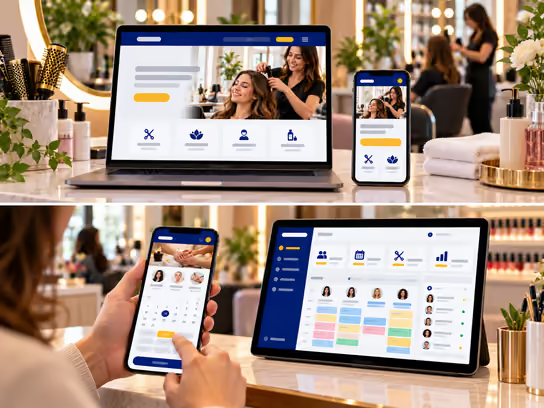
Hair salons, barbershops, nail salons, skincare, lash and brow businesses, spas and massage centers need a website that clearly presents their services, business hours, location and booking options. We help you build a website that displays your services, the prices you set and photos you have permission to publish, making it easy for customers to choose a service and contact your business.
If you have a team of specialists or multiple locations, we can develop a web application to organize bookings, staff schedules and resources, and manage gift cards, memberships, visit histories and payments. You can start with an informational website and gradually add operational features based on your business needs.
2. Types of websites and systems
- Informational website for a salon or barbershop: Presents haircutting, styling and barbering services, business hours, location and contact details. Example: a salon that displays its services with authorized photos and an inquiry form.
- Beauty and spa service booking website: Lets customers choose a service, specialist and available appointment. Example: a customer books a nail service or a haircut and receives a booking confirmation.
- Website for multiple services or locations: Organizes pages for hair, skincare, lashes, brows and massage services, with information for each location. Example: a spa that displays services and available appointments at its locations.
- Salon and center management system: A web application for managing specialist schedules, bookings, resources, products, memberships and invoices. Example: a manager monitors appointments and prevents the same specialist from being booked for two services at once.
3. Core website and system components
Customer and visitor interface
- Learn about the center, its services and available specialties.
- View business hours, locations and contact information.
- Browse work photos published with the subjects' consent.
- Read each service description, approximate duration and booking policy.
- Choose a service, specialist and location when these options are available.
- View available times and submit a booking request.
- Pay a booking deposit if required by the center's policy.
- Receive appointment confirmations and reminders.
- Reschedule or request cancellation under the center's policy.
- Purchase a gift card or subscribe to a recurring service when offered.
- View previous bookings and payments in a private account when available.
- Send an inquiry or comment to the center.
Business owner and staff dashboard
- Receive, confirm or modify bookings.
- View daily and weekly appointment schedules.
- Manage the availability of hairstylists, barbers and specialists.
- Set service durations and necessary gaps between appointments.
- Manage rooms, chairs and shared resources.
- Record customer arrivals, cancellations and no-shows.
- Organize customer information and service history according to permissions.
- Track gift cards and memberships when offered.
- Prepare invoices and record payments.
- Track products and supplies used or sold.
- Send permitted reminders and follow-up messages.
Administration dashboard
- Manage staff accounts, roles and permissions.
- Manage the approved service list, durations and prices.
- Set booking, cancellation and late-arrival rules.
- Manage locations, business hours and closures.
- Organize resources and specialist schedules.
- Manage gift cards, memberships and promotions.
- View booking and recorded revenue reports.
- Manage payment, notification and integration settings.
- Review activity logs and oversee security and backups.
4. Supporting technical systems
| System | Purpose |
|---|---|
| Appointment booking system | Display available times and manage bookings and changes |
| Customer relationship management (CRM) | Organize customer information, inquiries and visit history |
| Staff scheduling system | Set availability and time off and assign appointments |
| Resource management system | Coordinate the use of chairs, rooms and shared equipment |
| Google Calendar or Microsoft Outlook | Sync appointments when suitable integration is available |
| Google Maps | Show the center and branch locations and help customers find them |
| Inventory management system | Track care products, supplies and items offered for sale |
| Stripe or PayPal | Collect online payments when needed |
| Gift card and membership system | Manage balances, usage and renewals under approved policies |
| Notification system | Send appointment confirmations and reminders |
| Forms and consent management system | Collect forms related to nonmedical services when needed |
| Google Analytics | Analyze website use according to privacy settings |
| Backups and activity logs | Support data recovery and record important actions |
Supporting systems can be selected based on the center's size and services. A small salon may only need a website with appointment booking, while a center with several specialists or locations may need schedules, resources and payments connected in one system.
5. Advanced features
Scheduling appointments by specialist and available resources
Imagine a customer wants to book a hair service that requires a particular specialist and an available chair, while other appointments are scheduled at the same time. The system can compare the service duration with the specialist's schedule and available resources, then display possible times before confirming the booking.
When an appointment changes or a staff member is absent, the schedule can be updated and affected customers notified according to the settings. This helps organize operations, but schedule accuracy depends on correctly entering service times and staff availability.
Managing memberships, gift cards and repeat visits
Imagine a center offering memberships for regular care services or gift cards that can be redeemed on future visits. Staff can register the membership or card and specify included services and the period of use according to the center's policy.
When a visit is booked, the system can show the available balance, record its use and send an appropriate notification. Management can track memberships and redeemed cards while keeping expiration, cancellation and refund terms clear to customers.
6. Development and operating costs
Costs vary based on the number of services, specialists and locations, the booking process, payment and membership features, third-party integrations and security requirements.
| Solution type | Development cost | Operating cost |
|---|---|---|
| Informational website for a salon or barbershop | Low | Low |
| Service website with booking requests | Low to medium | Low |
| Website with online booking and specialist schedules | Medium | Low to medium |
| Booking, resource and staff management system | Medium to high | Medium |
| Membership, gift card and payment system | High | Medium to high |
| Integrated multi-location system | High | High |
Operating costs may include hosting, maintenance, backups, messaging, third-party subscriptions and payment processing fees, depending on the project scope and usage.
7. Digital solution levels
You can start with a website that presents your services and makes it easy to get in touch, then add online booking, staff management and memberships as your business expands.
| Feature | Starter | Advanced | Comprehensive |
|---|---|---|---|
| Professional informational website | ✓ | ✓ | ✓ |
| Service and location pages | ✓ | ✓ | ✓ |
| Gallery of photos authorized for publication | ✓ | ✓ | ✓ |
| Business hours and contact details | ✓ | ✓ | ✓ |
| Inquiry and appointment request form | ✓ | ✓ | ✓ |
| Online appointment booking | — | ✓ | ✓ |
| Specialist and service selection | — | ✓ | ✓ |
| Staff dashboard | — | ✓ | ✓ |
| Staff schedule management | — | ✓ | ✓ |
| Automatic reminders and notifications | — | ✓ | ✓ |
| Customer management and visit history | — | ✓ | ✓ |
| Room, chair and resource management | — | — | ✓ |
| Booking deposits and no-show policy | — | — | ✓ |
| Memberships and gift cards | — | — | ✓ |
| Inventory and product management | — | — | ✓ |
| Online payments and invoices | — | — | ✓ |
| Advanced permissions and activity logs | — | — | ✓ |
| Advanced operational and administrative reports | — | — | ✓ |
| Multi-location support | — | — | ✓ |
These levels illustrate how to organize the project scope; they are not fixed packages. We determine the final features and cost through a quote based on the services, staff, locations and systems required.
8. Legal and privacy considerations
Salons, beauty centers and spas may handle customer names, contact details, appointment times, work photos, service preferences and payment information. Legal requirements may vary by service and state. When developing a website or system for this sector, consider the following:
- Scope of services: This page covers hair, barbering, nails, nonmedical skincare, lashes, brows, massage and spa services. It does not cover medical aesthetics, injections or medical laser procedures.
- Professional licenses: Some beauty, barbering and massage services may require professional or facility licenses. Building a booking system does not mean the business is legally licensed.
- Customer data protection: State-level U.S. privacy laws, such as the California Consumer Privacy Act (CCPA), may apply depending on the business and the law's scope.
- Photos and content: Appropriate permission should be obtained before publishing customer photos or images of their services, and rights to images and other materials must be respected.
- Service forms and consent: Some services may require appropriate information or consent. The business owner and relevant professionals must determine the required content; the system is not a source of professional or medical advice.
- Booking, cancellation and memberships: Cancellation terms, deposits, no-show fees, gift cards and recurring memberships may be subject to disclosure, consent and consumer protection requirements.
- Online payments: Processing card data may require compliance with PCI DSS, depending on the payment method.
- Marketing messages: Some messages and calls may be subject to laws such as the Telephone Consumer Protection Act (TCPA), depending on the communication and consent.
- Digital accessibility: Accessibility requirements may apply under the Americans with Disabilities Act (ADA) or other laws, depending on the business. WCAG guidelines can be used as a technical reference.
- Analytics and advertising tools: Appropriate disclosures and privacy options should be considered when using Google Analytics, Google Ads and Meta Pixel.
We can develop technical features to organize bookings, permissions, payments and data, but identifying legal and professional requirements and verifying compliance requires an independent assessment by the business owner and qualified advisors. Security features or third-party services do not guarantee compliance with any particular law or standard.
9. Start building your beauty business's digital presence
Whether you are an independent barber or run a hair salon, nail salon or spa offering nonmedical services, we help you choose a suitable solution, from a website that presents services and accepts booking requests to a web application that manages specialists, appointments, memberships and locations, with room to add features as your business grows.